
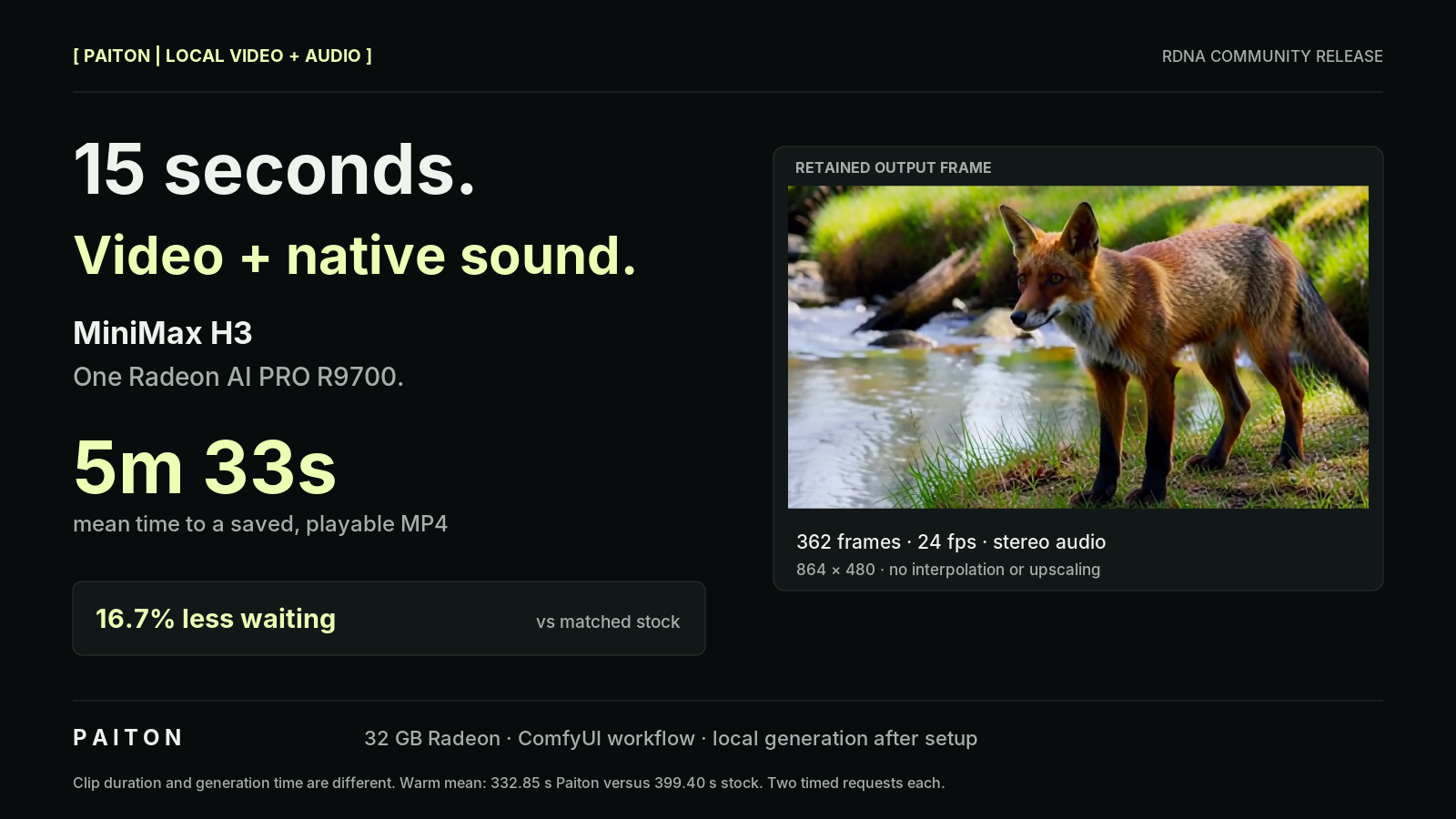
A fox steps out of the trees and pauses beside a stream. The camera follows the scene, accompanied by birds and flowing water. This is one continuous MiniMax H3 generation, with its original stereo soundtrack, created locally on a single Radeon AI PRO R9700.
Paiton produces the playable clip in 5 minutes 33 seconds on average. Matched stock takes 6 minutes 39 seconds. That is about 67 seconds less waiting per clip, with identical MP4 hashes in the retained comparison.
This is the next free Paiton RDNA community package: local video with sound, an included ComfyUI workflow, and a benchmark that runs all the way from a fresh prompt to a saved MP4. No cloud inference service is required after setup.
Open the fox video (MP4, 5.5 MB). Press play to watch and hear the original sound.
One generated scene: 864 × 480, 362 frames at 24 fps, or 15.0833 seconds of video. Native 32 kHz stereo audio. No frame interpolation, upscaling, soundtrack replacement or clip concatenation. The 15 seconds describe the output, not the time needed to generate it.
The same clip, about a minute sooner
At the matched Turbo8 profile with eight denoiser evaluations, Paiton reduces complete-request latency by 16.66%. At that generation rate, the same active runtime projects to 19.99% more clips per hour.
| Complete request, matched Turbo8 | Stock | Paiton |
|---|---|---|
| Mean time to a saved, playable MP4 | 399.40 s | 332.85 s |
| Approximate waiting time | 6m 39s | 5m 33s |
| Projected fixed-length clips per hour | 9.01 | 10.82 |
The comparison uses one fox prompt, seed 771, one warmup and two measured requests per engine. Every measured request includes fresh conditioning, denoising, video and audio decoding, H.264/AAC encoding, muxing and writing the MP4. Model downloads, process setup and the initial warmup are excluded.
The headline is therefore not a denoising-only speedup. It measures the wait for a playable file. Clips per hour is calculated as 3600 / mean request seconds, not measured in an hour-long production run. Prompt writing, review and rejected outputs add time in actual use.
Start creating in ComfyUI
On a Linux workstation with a 32 GB Radeon AI PRO R9700, Docker, Compose and working Radeon device access, run:
git clone --depth 1 https://github.com/Eliovp-BV/paiton-vllm-plugin.git
cd paiton-vllm-plugin
./models/MiniMax-H3/launch.sh
Open ComfyUI on localhost. The included workflow opens on the first visit. Edit the prompt, choose a seed and click Run. The engine selector offers stock and Paiton, and videos are saved in ~/paiton-videos/.
The first launch downloads the artifact image and SHA-256-verified checkpoints, and installs pinned ComfyUI components locally. Later launches reuse the models, image and caches. Initial setup needs internet access; cached generation does not need a model API, paid inference service or cloud GPU.
The model guide contains the setup instructions, terminal commands, supported settings and license terms. Review the model and encoder licenses before use; the runtime does not replace those terms. The command above follows the repository's current default branch; use a recorded release or commit when reproducing a specific benchmark.
What your workstation needs
This is a 32 GB GPU workload, not the lower-memory image-generation profile from our FLUX.2 klein release. The long-clip record reaches 30.34 GiB of sampled driver memory. Components are scheduled with memory management between phases; the complete pipeline is not claimed to remain in VRAM at once.
| Requirement | Tested configuration or recommendation |
|---|---|
| GPU | One AMD Radeon AI PRO R9700, 32 GB |
| Host | Intel i5-8400, 16 GB system RAM and 4 GB swap |
| Recommended system RAM | 24 GB or more for the browser, longer requests and other applications |
| Storage | SSD with 60 GB free for the selected setup, caches and outputs |
| Selected checkpoints | Approximately 33.96 GB; both adapters and their shared components total 35.92 GB |
| Filesystem consideration | Without hard-link support, duplicate cache copies can require another 34 GB |
The 16 GB host used swap. Across the retained records, lifetime process RSS reached 12.09 GiB and sampled process swap reached 1.24 GiB. Those figures are not evidence that every 16 GB system will run comfortably. Driver-memory telemetry was sampled every 0.5 seconds and may miss brief peaks.
With weights already present, the first 15-second requests took 423.6 seconds for stock and 381.0 seconds for Paiton, after process setup. Downloads, verification, image preparation and cold caches add further time. The 332.85-second result is the mean of the two measured Paiton requests after that warmup, not first-launch time.
Same settings, same retained output
Both engines use the same upstream pruned and quantized W4A8 generation profile, Turbo adapter, prompt, seed, frame count, scheduler and guidance. Paiton optimizes execution of that profile. It does not claim the upstream model pruning, quantization or Turbo training as its own work.
For the retained 15-second fox case, all six recorded MP4 outputs have the same SHA-256 hash: a warmup and two measured requests from each engine. The complete results record and per-run CSV are included below. This supports exact output agreement for this test, not a promise of identical files for every model, prompt or future runtime.
The original full-precision 33B model is not the quality baseline. Both measured engines already include the upstream compression and adapter choices. MiniMax's hosted context-processing system and 2K regeneration stage are also outside this package. This is the local H3 base-generation path, not a claim to reproduce the entire hosted service.
The supplied quality review describes a consistent fox across the sequence, distinct decoded frames and natural sound. That is a useful retained example, not a comprehensive video-quality evaluation.
Four steps are an option, not a hidden benchmark shortcut
An earlier short-clip suite covered wildlife, a speaking barista and pouring water. These outputs contain 124 frames at 24 fps, or approximately 5.17 seconds of video, with native stereo audio.
| Earlier short-clip suite | Stock | Paiton | Lower latency |
|---|---|---|---|
| Turbo8, eight evaluations | 95.83 s | 80.60 s | 15.89% |
| Turbo4, four evaluations | 64.15 s | 54.38 s | 15.24% |
These are separate short-clip results reported in the release notes, not additional samples in the 15-second benchmark. Each row compares the same adapter and evaluation count across engines.
The four-step adapter gives a faster iteration option, but it changes the quality tradeoff. In the pouring test, it produced two bottles where one was requested. Eight steps preserved one bottle but still showed excessive foam and incomplete placement. Both versions had a brief native audio transient.
Turbo8 remains the quality-oriented default. We do not compare four-step Paiton against eight-step stock and call the reduced work a compiler speedup.
Open the barista video (MP4, 0.7 MB). Spoken line: “Here is your coffee.”
Turbo4 dialogue example, approximately 5.17 seconds. The supplied reviewer notes report intelligible “Here is your coffee” speech and reasonable lip synchronization on the byte-identical stock counterpart. This is a separate example from the timed 15-second fox comparison. Clip provenance.
Measure the whole request
The benchmark ran on the workstation's existing AUTO/COMPUTE profile. We did not alter clock, power, voltage or cooling controls. Conditioning is recomputed for each request rather than reused from a previous prompt.
| Mean time per request phase | Stock | Paiton |
|---|---|---|
| Conditioning | 21.72 s | 10.82 s |
| Denoising | 317.99 s | 262.30 s |
| Video decoding | 42.52 s | 42.47 s |
| Audio decoding | 3.35 s | 3.37 s |
| Encoding and muxing | 13.80 s | 13.87 s |
The phase measurements account for essentially the complete request. Small bookkeeping intervals sit outside those phases. Keeping the saved-file boundary matters: accelerating model execution does not make video decoding, audio decoding or file encoding disappear.
This is a small, fixed-seed comparison on one workstation. It establishes the result for the published profile, not a speed guarantee for all prompts or a claim to be faster than every other H3 runtime.
The downloadable per-run timings and benchmark results preserve the measured values, settings, output hashes and memory summaries. Paiton's compiler implementation remains separate from this public benchmark evidence.
Lower cost per generated minute
A video workload calls for video economics. We count cost per complete clip and per generated minute, not internal diffusion tokens.
| Illustrative ownership cost | Stock | Paiton |
|---|---|---|
| USD per 15.08-second clip | $0.0373 | $0.0311 |
| USD per generated video minute | $0.148 | $0.124 |
| EUR per generated video minute | €0.205 | €0.171 |
At equal assumed cost per productive hour, the measured latency reduction translates into 16.66% lower modeled cost per generated minute. The inverse is 19.99% more generated video for the same active-runtime budget.
The scenarios amortize a $1,299 GPU with $0.17/kWh electricity, or a €1,749 GPU with €0.2558/kWh electricity, over 5,000 productive hours. Both engines are assigned an equal 450 W whole-system draw. These are scenario inputs, not current retail quotes or measured wall power.
The calculation excludes the host purchase, idle time, cooling, maintenance, financing, tax, residual value, manual review and rejected generations. If only half of the generated clips are usable, cost per accepted clip doubles. These are generation costs, not the price of a finished production minute.
The scenario data and calculator are included so you can substitute your own hardware cost, utilization and electricity rate.
Try the local package. Bring us the production workload.
This release adds video with native sound to Paiton's free RDNA community packages, alongside local language models and image generation. The immediate result is practical: the same retained clip, on the same Radeon, saved about a minute sooner.
Get the MiniMax H3 setup and benchmarks, or inspect the Hugging Face runtime package.
Running production inference on AMD Instinct or CDNA? Talk to us about your models, latency targets and cost per usable result. This Radeon benchmark is one qualified workload; larger deployments need their own measurements. Learn more about Paiton.
Powered by MiniMax H3.