
The Radeon AI PRO R9700 already does a lot of local AI work with Paiton. Qwen3.8 27B answers coding questions, FLUX.2 klein draws an image in about a second, Qwen-Image 2.1 and MiniMax-H3-Image generate and edit images, and Idol turns one picture into a 3D asset in about 16 seconds.
Video was the gap. Our earlier video packages ran inside ComfyUI and PyTorch, where Paiton could only speed up part of the work: from no gain on Wan2.2 to about 15% on MiniMax H3. This week we released two video models with native Paiton inference from the prompt through the video and audio decoders. Both make the soundtrack together with the picture:
| Model | What it does | 5-second clip on one R9700 |
|---|---|---|
| LTX-2.5, Lightricks, 22B | Text or a first frame to video with audio, 704p and 1080p | 18.1 s at 1280 x 704; 48.8 s at 1920 x 1088 |
| MiniMax H3 v1.2 | Video with stereo audio from a prompt and up to nine reference images | 30.4 s with one reference; 44.3 s with nine, at 864 x 480 |
Both fit within the card's 32 GB of VRAM: the peaks we measured were 27.4 GiB for LTX-2.5 at 1080p and 26.8 GiB for MiniMax H3. That is GPU memory, not the whole system's memory use. Both also stream text-encoder layers from system RAM. The timing boundaries differ between the two models and are explained below.
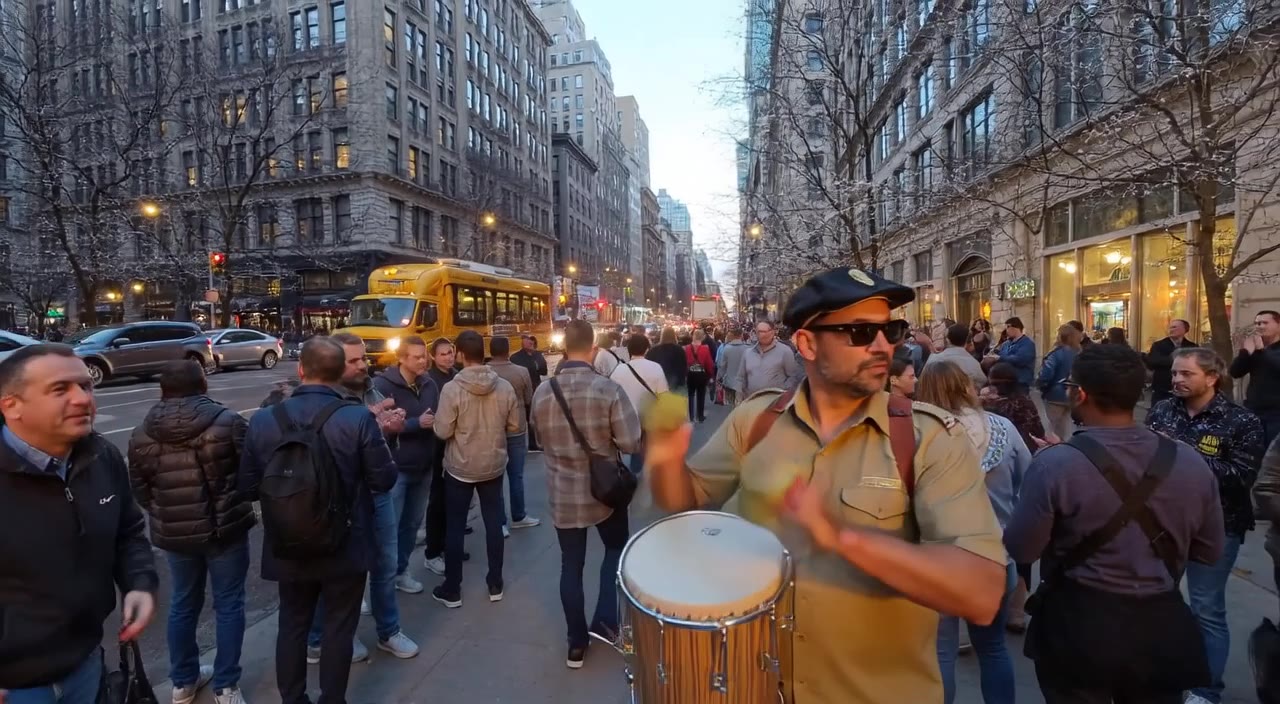
The cover is an unaltered frame from the AI-generated LTX-2.5 clip below.
In this article
- Watch the LTX-2.5 clip
- LTX-2.5 results and quality
- MiniMax H3 v1.2 results and quality
- Try it on your R9700
- Licenses
Watch the clip
AI-generated video and audio from LTX-2.5 on one R9700, unaltered from the supplied example. Prompt: "A street drummer plays a fast rhythm on a city sidewalk at dusk while the crowd claps and cheers". 1280 x 704, 121 frames at 24 fps, about 5 seconds of video. The measured warm request takes 18.1 seconds. Press play to hear the soundtrack.
LTX-2.5: a 5-second clip in 18 seconds
LTX-2.5 is Lightricks' 22B audio and video model. We run its distilled two-stage pipeline: 8 steps at half size, a 2x upscale of the latent, then 3 steps at full size, followed by the video and audio decoders. On one R9700 the stock pipeline cannot hold the 16-bit weights, so it has to offload them to the CPU, and a 1080p clip takes seven minutes. Paiton's native GPU pipeline brings that down to 48.8 seconds, while streaming the text-encoder layers that do not fit in VRAM from host memory.
121 frames with audio, one R9700 at 300 W. Paiton: warm server-side HTTP request through finished MP4, median of three runs. Stock: warm BF16 pipeline with CPU offload. Paiton uses FP8, so this compares serving configurations, not identical precision.
| Request, 121 frames, about 5 s at 24 fps | Paiton | Stock LTX-2.5, BF16 | Speedup |
|---|---|---|---|
| Text to video, 1280 x 704 | 18.1 s | 128.6 s | 7.1x |
| Image to video, 1280 x 704 | 21.1 s | Not measured | Not measured |
| Text to video, 1920 x 1088 | 48.8 s | 420.5 s | 8.6x |
| Image to video, 1920 x 1088 | 51.9 s | Not measured | Not measured |
Paiton's times are measured server-side from the HTTP request to the finished MP4, warm, the median of three runs, with the card at its 300 W limit. They include the text encoder, both sampling stages, the upscale, both decoders and the H.264 and AAC encoding. Startup and weight downloads are excluded.
Most of the speed comes from running the transformer in FP8, both weights and activations, and the attention in INT8 and FP8, on kernels written for the R9700's RDNA4 chip. The timestep conditioning is computed once ahead of time for the distilled schedule's nine fixed noise levels. The steps run as HIP graphs, and the 12B text encoder streams the layers that do not fit on the card from host memory.
Quality matters here. An FP8 copy of this 11-step sampler does not reproduce the 16-bit model's video exactly: small numeric differences can grow over the steps into a different camera path or layout. Lightricks' own FP8 mode does the same. We compared both FP8 versions with the 16-bit run from the same noise. At 704p, Paiton is as close to it as the stock FP8 mode: 25.7 dB against 25.3 dB PSNR. At 1080p it is 1.1 dB further away on the mean of five prompts, with two prompts lower and three equal or higher. We looked at the frames side by side and found no blocking, banding or noise in those cases. This is a small quality check, not a promise of identical videos.
The LTX-2.5 guide lists the full numbers and the limits of this first build: two measured sizes, no portrait sizes, and the clip length has to be given.
AI-generated image-to-video example at 1920 x 1088. The measured request produces 121 frames with audio in 51.9 s.
MiniMax H3 v1.2: video from your own reference images
MiniMax H3 makes a clip from a prompt plus references: up to nine images, or a video whose soundtrack it uses as
reference audio. You can write "the red panda from <Picture 1> walks through a sunlit forest" to guide the clip with
your own image. The audio is 32 kHz stereo.
Our earlier v1.1.0 package used ComfyUI, with Paiton replacing the sampler. v1.2 replaces the other model components too: the 32B text encoder, the reference encoder, the transformer and the video and audio decoders now run on Paiton's HIP kernels, with no PyTorch, Triton or ComfyUI in the container. At 864 x 480, the gain over the stock engine grows with the number of references:
124 frames, Turbo4, one R9700 at 300 W. Stock: warm mean of two runs, reference loading through written MP4. Paiton v1.2: published M2 run, prepared inputs through written MP4, excluding CPU input preparation and weight loading. Stock uses W4A8; v1.2 uses FP8.
| Request, 124 frames, about 5 s, four-step Turbo4 | Stock | Paiton v1.1.0 | Paiton v1.2 | v1.2 against stock |
|---|---|---|---|---|
| 864 x 480, 1 image reference | 67.4 s | 50.6 s | 30.4 s | 2.2x |
| 864 x 480, 3 image references | 91.2 s | 85.3 s | 33.4 s | 2.7x |
| 864 x 480, 9 image references | 167.5 s | 178.7 s | 44.3 s | 3.8x |
| 1344 x 768, 9 image references | 278.7 s | 258.4 s | 114.1 s | 2.4x |
| 864 x 480, 1 video reference with its soundtrack | Not measured | Not measured | 203.8 s | Not measured |
The stock comparison supplied for this article uses the MiniMax H3 reference-to-video workflow in ComfyUI with its own engine, on the same card, with the same prompts, reference images, sizes and seed as v1.2. It runs the W4A8 checkpoint our v1.1.0 package ships, while v1.2 runs FP8 weights. The v1.1.0 column comes from the October release, with other prompts and images of the same sizes; it is historical context, not a matched three-way test.
The v1.2 measurements start with prepared inputs and end with the written MP4. They exclude CPU input preparation, reported as less than two seconds, and weight loading. With many references, the stock engine spends more than half its time encoding them: 89 seconds of the 168 seconds with nine. That is where v1.2 gains the most.
The eight-step Turbo8 preset takes 51.4 s for the first row in v1.2. Peak VRAM is under 27 GiB in v1.2, against 30.5 to 30.8 GiB reported for v1.1.0.
For quality, we compared five cases with the 16-bit model on an Instinct MI355X, using the same prompts, references, seed and starting noise. Prompt alignment, measured by CLIP score, is the same as the 16-bit model's within the spread between cases. With one or three references, the clips stay close to the 16-bit ones. With nine references, the subjects and the scene are all there, but they can stand in different places.
The benchmark report has the v1.2 per-case scores and limits: up to about 9.4 seconds at 768p with nine references, no audio-only references, and Base50 stays on v1.1.0.
An earlier MiniMax H3 example, not a v1.2 benchmark output. The full 15-second clip is in our original video article.
Try it
Both models start with one command from a checkout of the paiton-vllm-plugin repository. You need one R9700, Linux, Docker and a working ROCm kernel driver. The first start downloads the weights, about 38 GB for LTX-2.5 or 51 GB for MiniMax H3 Turbo4, and checks every file against its SHA-256.
Allow for system RAM as well as VRAM. LTX-2.5 pins about 14.1 GB of text-encoder weights in host memory; MiniMax H3's fastest text-encoder mode needs about 41 GB of free host RAM and has not been tested on hosts below 64 GB. The guides cover the full RAM and disk requirements.
For LTX-2.5, accept the license on the weights page first. Replace the token placeholder below with a Hugging Face read token from that same account:
git clone --depth 1 https://github.com/Eliovp-BV/paiton-vllm-plugin.git
cd paiton-vllm-plugin
export HF_TOKEN='hf_your_read_token'
./models/LTX-2.5/launch.sh
# In a second terminal, from the same checkout, once it prints READY:
./models/LTX-2.5/run.sh generate "A street drummer plays a fast rhythm on a city sidewalk at dusk while the crowd claps and cheers" --out drummer.mp4
Both servers default to port 30000. Stop LTX-2.5 before trying MiniMax H3 on that port:
./models/LTX-2.5/run.sh stop
For MiniMax H3 v1.2, from the same checkout, with a reference image saved as panda.png:
PAITON_DETACH=1 ./models/MiniMax-H3/native/launch.sh http
docker logs -f paiton-minimax-h3-v12
# Wait for READY, then run the request in another terminal:
curl --fail-with-body -o panda.mp4 -F image=@panda.png \
  -F prompt='The red panda from <Picture 1> walks through a sunlit forest. Audio: birds and a stream.' \
  http://127.0.0.1:30000/v1/videos/generations
Both serve an HTTP API. H3 also comes with a ComfyUI node that sends requests to the native server. These are model-specific video launchers, separate from the language-model presets.
Licenses
The repository code is Apache-2.0, but that does not replace the model licenses or the terms for derivative runtimes. LTX-2.5 uses the LTX-2.x Community License. Companies with US$10 million or more in annual revenue need a paid license from Lightricks for use beyond non-commercial testing and research. Published generated media must be identified as AI-generated.
MiniMax H3 uses its own Community License. Its standard grant excludes the EU, UK, South Korea and US, including use and display of outputs, and requires written authorization for organizations above US$20 million in annual revenue. Check the full terms and any separate permission applicable to your use. A downloadable runtime is not unrestricted permission to use the model or its outputs.